
E-Checklist1.5.1 - Google Play
You'll be able to see results in few seconds.
Publisher Description
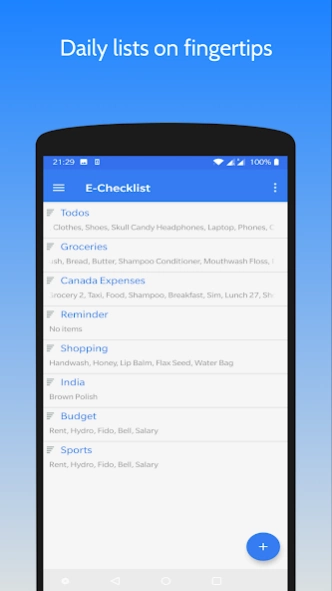
Checklist app - Add, modify, delete your daily lists anytime anywhere
Checklist app to keep things on your finger tips. It helps you in daily tasks and ToDo list management. It's a simple, easy to use app that keeps you on track.
What it allows you to do:
--------------------------------------
• Create, modify, delete checklists
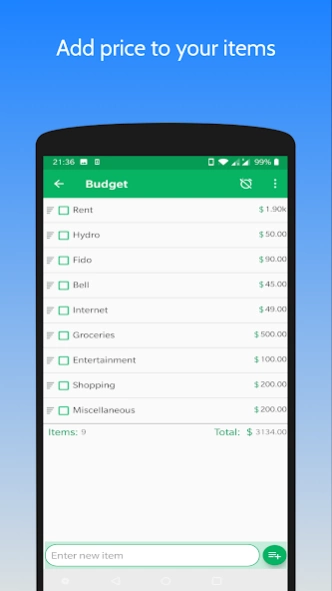
• Create a budget list by adding price column
• Add reminder to checklist
• BACKUP data on Google Drive & RESTORE when you reinstall app
• Auto and manual sort options for easy look up
• Share checklist as a text message and convert it to checklist using Import feature
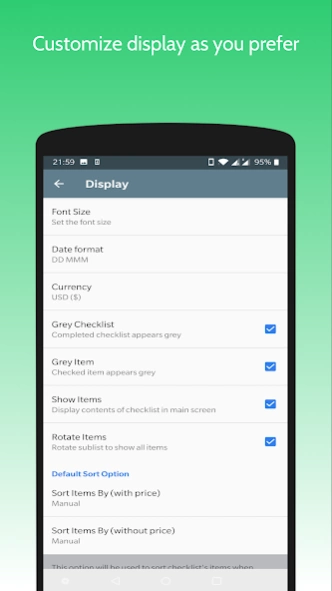
• Customize font size, date format, alarm tone and more from "Settings"
• Duplicate a checklist
• Copy or move items from one checklist to other
• Rename checklists and its items
FAQs
----------
1. How to renames checlists/items?
- Long press the item, select edit icon on top and rename.
2. How to delete selected items?
- Long press on intended item, selected other required items and click delete icon on top.
3. How to share checklist?
- Open checklist, click on menu icon. Select 'Share Checklist' from drop down menu.
Select app to share. Currently checklist is shared as text message.
4. How to duplicate a checklist?
- Long press on checklist to duplicated and select copy icon on top. Provide new name for duplicated list and click ok.
5. How to manually sort checklists and their items?
- Go to option menu, click on sort, select Manually from menu. Now drag n drop icon will appear on left on checklist/item name. Press and hold the that icon and move up and down to required position.
6. How to move or copy items from one list to other?
- Open checklist, long press on required item and select other items too. Next click on move or copy icon on top. Select target checklist from menu and click OK..
7. How to create budget list?
- Create new checklist from + button on main screen. Hi to its option menu. Select Add Price. Now add items they will come with extra price column. Same can be done with existing checklist.
8. How to backup checklist?
- Go to settings page from menu. Go to Backup data page. Click on create backup. If not logged in, select account and login first. Give required permissions if asked.
9. How to restore data?
- Reinstall app, keep internet connection ON. Sigin in to your Gmail account. You will be guided to restore your data if backup was taken in past.
Kindly share your reviews. We would love to hear your feedback to grow this app further.
E-mail: yogdroid88@gmail.com
About E-Checklist
The company that develops E-Checklist is Yogesh Sanwal. The latest version released by its developer is 1.5.1.
To install E-Checklist on your Android device, just click the green Continue To App button above to start the installation process. The app is listed on our website since 2020-09-20 and was downloaded 0 times. We have already checked if the download link is safe, however for your own protection we recommend that you scan the downloaded app with your antivirus. Your antivirus may detect the E-Checklist as malware as malware if the download link to yapps.checklist is broken.
How to install E-Checklist on your Android device:
- Click on the Continue To App button on our website. This will redirect you to Google Play.
- Once the E-Checklist is shown in the Google Play listing of your Android device, you can start its download and installation. Tap on the Install button located below the search bar and to the right of the app icon.
- A pop-up window with the permissions required by E-Checklist will be shown. Click on Accept to continue the process.
- E-Checklist will be downloaded onto your device, displaying a progress. Once the download completes, the installation will start and you'll get a notification after the installation is finished.
Program Details
System requirements
Download information
Pricing
Version History
version 1.5.1
posted on 2020-09-21
Google Drive Connection Issue Fix
version 1.5.0
posted on 2018-10-22
- Made compatible with Android Pie
- Added DISABLE_KEYGUARD permission to display reminders on locked phone
version 1.4.8
posted on 2017-09-24
Now manage your checklists better:
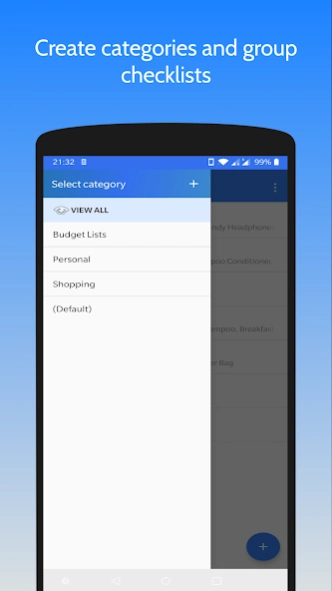
- Create categories
- Move lists between categories
- Completed checklists appear grey (manage from Settings)
version 1.4.3
posted on 2016-12-13
v1.4.3: Bug fix,Key updates:,v1.4.1: New 'Import' feature- create checklist from a text message,v1.4.0: Manual Sort: Drag n drop items to rearrange,v1.3.4: Backup & Restore app data on Google Drive,v1.3.1: Copy/Move items among checklists, Duplicate a checklist,v1.2.0: Option to add reminder to checklist,v1.1 : Option to add price column to checklist
Disclaimer
Official Google Play Link
We do not host E-Checklist on our servers. We did not scan it for viruses, adware, spyware or other type of malware. This app is hosted by Google and passed their terms and conditions to be listed there. We recommend caution when installing it.
The Google Play link for E-Checklist is provided to you by apps112.com without any warranties, representations or guarantees of any kind, so access it at your own risk.
If you have questions regarding this particular app contact the publisher directly. For questions about the functionalities of apps112.com contact us.
